How to use

From setup to trade, step by step

Find a setup, check it has a record, read the grade and the risk : reward, confirm the entry, then open the trade - on paper first, or on your exchange.

1

Find a setup

Open Signals › Scanner. It lists the live BUY and SELL setups on every coin, best first.

  • Filter by Buy / Sell, timeframe, grade and type to see only what you trade.
  • Sort by Strongest, Latest or Highest win rate.
  • Tap a row to open that coin's chart with its full trade plan.

No time to watch? Tap Alert me on a coin and EarlyPip tells you the moment a setup fires.
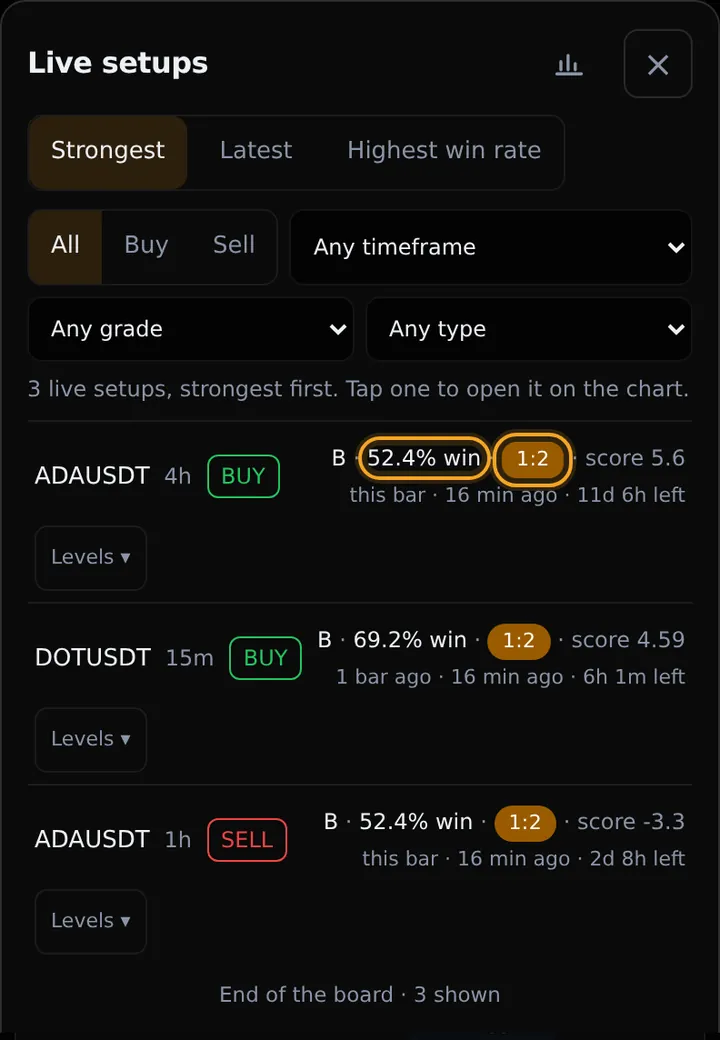
The Scanner: live setups ranked best first, each with its coin, side, timeframe, grade and win rate
The Scanner: live setups ranked best first, each with its coin, side, timeframe, grade and win rate. Example from the site.
2

Check the win rate

Before trusting a call, check how this coin has done.

  • In the Scanner, the % win badge is that coin's verified win rate.
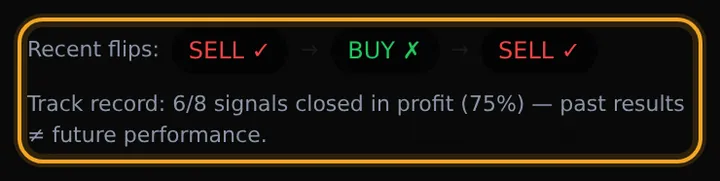
  • On the coin's page, under the signal, Track record shows how many recent calls closed in profit, and Recent flips shows each call with ✓ or ✗.
  • The Track record page shows every finished call - wins and losses - by coin and timeframe.

A handful of calls proves little. The more finished calls behind a win rate, the more it means. Past results do not guarantee future results.

The signal card: recent calls on this coin and its track record - for example 6 of 8 closed in profit (75%)
The signal card: recent calls on this coin and its track record - for example 6 of 8 closed in profit (75%). Example from the site.
3

Read the timeframe, grade and risk : reward

The top of the signal card tells you how good the setup is:

Timeframe
The candle size the call is made on. 15m moves in hours, 1h within a day or two, 4h over days, 1d over weeks. Pick the one that fits how often you can check.
Grade
A+ - every higher timeframe agrees and the trend is fresh. A - the higher timeframes mostly agree. B - mixed. C - against the bigger picture.
Confidence
How strong the evidence is, in %. Tap Why this confidence to see what it is made of.
Valid for
How long the setup stays open for an entry.
Risk : reward
In the trade plan. 1:2 means the first target is twice as far as the stop: risk 10 to make 20. 1:3 means risk 10 to make 30. Higher is better, and fewer wins are needed to come out ahead.
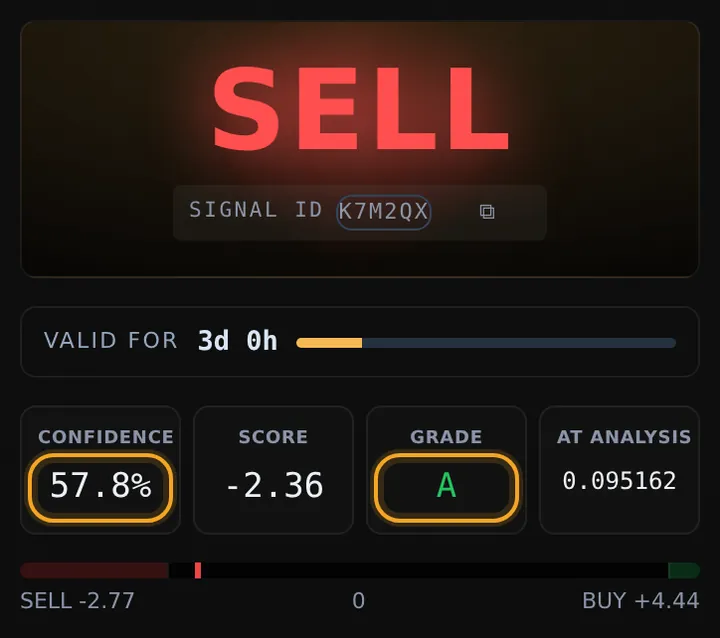
The top of the signal card: SELL, how long it stays valid, confidence, score and grade A
The top of the signal card: SELL, how long it stays valid, confidence, score and grade A. Example from the site.
4

Check the bigger timeframes agree

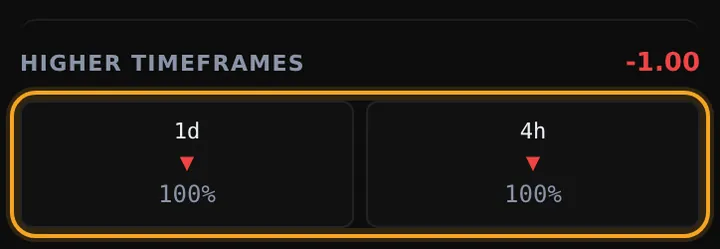
Higher timeframes shows which way the bigger charts point. Arrows the same way as the call mean they agree.

  • A SELL on 1h with 4h and 1d also pointing down is a setup worth taking - this is what lifts a grade to A or A+.
  • A lone call against everything above it is the one to be careful with - it usually also has a lower grade.
  • Every timeframe at once, just below, lists the last call made on each timeframe and how long ago.
Higher timeframes: for this SELL on 1h, both 4h and 1d point down (-1.00 = fully against buying)
Higher timeframes: for this SELL on 1h, both 4h and 1d point down (-1.00 = fully against buying). Example from the site.
5

Confirm the trade

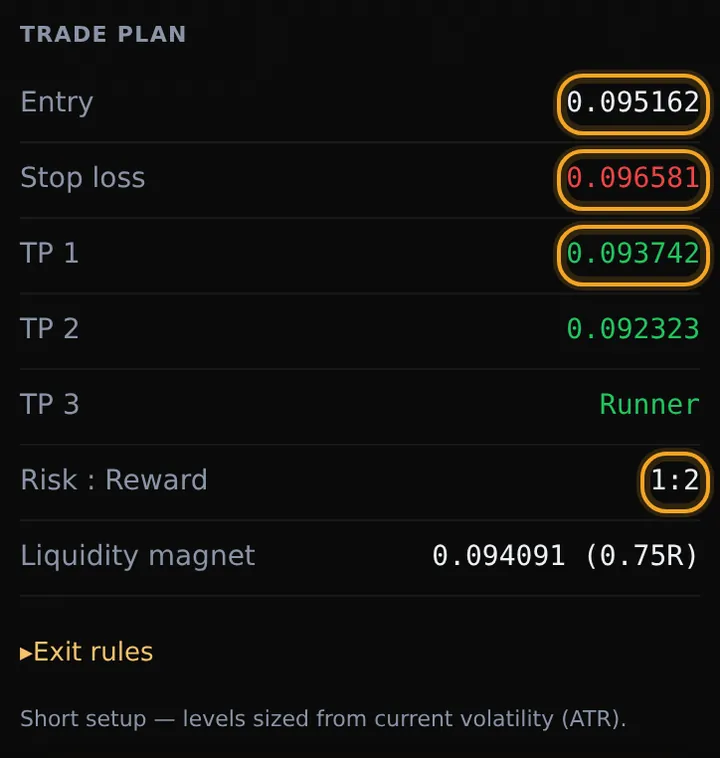
The Trade plan gives every number you need: Entry, Stop loss, TP 1, TP 2, TP 3 (or Runner) and Risk : Reward. Open Exit rules for the full rules. Before you enter:

  • Price is still at the entry. Enter at the next candle's open if it is inside the entry zone or better; otherwise use a limit order at the zone's edge.
  • Skip it if it ran away. If price has not traded in the zone within 3 candles, or opens through the stop first, the call is void - let it go. Void calls are not counted in the track record.
  • The signal has not flipped. If it turns to the other side, the setup is invalid.
The trade plan: entry, stop loss, three targets and risk : reward, with the exit rules
The trade plan: entry, stop loss, three targets and risk : reward, with the exit rules. Example from the site.
6

Open the trade

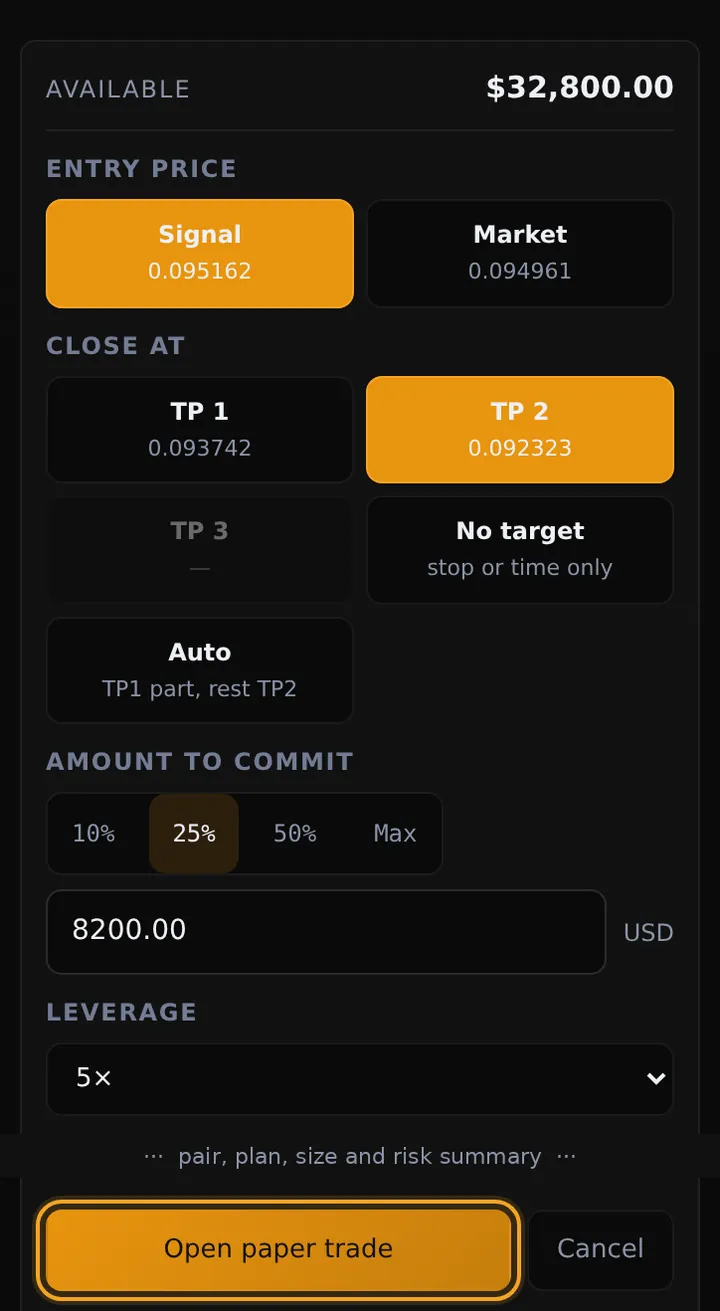
Practise first: tap + Paper-trade this signal. Choose the entry (the signal's price or the market), where to close (TP 1, TP 2, TP 3 or Auto), the amount and leverage, then Open paper trade. It is simulated - no real money - and settles itself at the stop, a target or the time stop. Follow it in Portfolio.

On your exchange: place the same trade with the plan's numbers - the entry, a stop loss at the plan's stop and a take profit at TP 1 or TP 2. Set the stop loss when you open the trade, never later.

Size the trade so that hitting the stop loses only a small part of your account - many traders risk 1-2% per trade.

The paper trade ticket: entry price, where to close, amount and leverage, then Open paper trade
The paper trade ticket: entry price, where to close, amount and leverage, then Open paper trade. Example from the site.
7

Manage it to the end

  • At TP 1 move your stop loss to your entry (break-even): the trade can no longer lose.
  • At TP 2 move the stop to TP 1 and let the rest run, or take it all.
  • Time stop: if neither the stop nor TP 1 is hit within the time the plan gives, close the trade - a setup that goes nowhere has already failed.
  • If the signal flips to the other side, close the trade.
  • Turn on alerts in Alerts & account to hear about new setups by push or email.

Before every trade

EarlyPip's signals are automated analysis for education. They are not financial advice, they can be wrong, and every trading decision is yours. Crypto trading carries a risk of loss.